
Staff holiday and absence requests for hair salons
A stylist who wants a day off asks for it in Stamly Business. Her manager gets a notification and answers on the phone. From the moment the time off is approved, no customer can book her for that period.
Time off at a glance
- Staff request holiday, sick leave, a course or other time off themselves in Stamly Business, as whole days or with start and end times.
- The owner or a manager approves it. When an owner or manager books time off for themselves, it applies at once.
- Times only close to new bookings once the request is approved. Appointments already booked stay put until someone moves them.
- Colleagues can see that she is away, but not why.
From “can I have Friday off?” to a closed calendar
Lise wants a Friday off. No note on the staffroom wall, and no message lost in the group chat.
Time off
Lise, stylistThu 09:12
Requests time off: Holiday, Friday 20 November. “Awaiting approval. Customers can still book until then.”
Kari, manager09:12
Notification: time off to approve. Lise, Fri 20 Nov.
Kari, manager09:40
Taps Approve. Stamly tells her Lise has 2 appointments in that period that need moving or cancelling.
Calendar09:40
Friday is closed to new bookings with Lise, in the app and online.
Lise, stylist09:40
Gets word that her time off is approved.
Time off is requested where the appointments are
The stylist asks for time off in Stamly Business, the same app she checks her appointments in. The recording shows Today, the customer card and the next bookings. No sound.
How a staff member requests time off
Under Profile in Stamly Business there is Time off, and in it a button that says “Request time off”. She picks Holiday, Sick leave, Course or Other, marks the first and last day in the week strip, and adds a comment if she wants to. Only the owner and her manager can read the comment.
If it isn’t a whole day, she switches off “Whole days” and chooses times. A dentist appointment at two o’clock doesn’t need to take the whole of Friday.
Until someone answers, the request sits in her list as “Awaiting approval. Customers can still book until then”. While it is waiting she can change it or withdraw it.
The manager answers from a phone or the portal
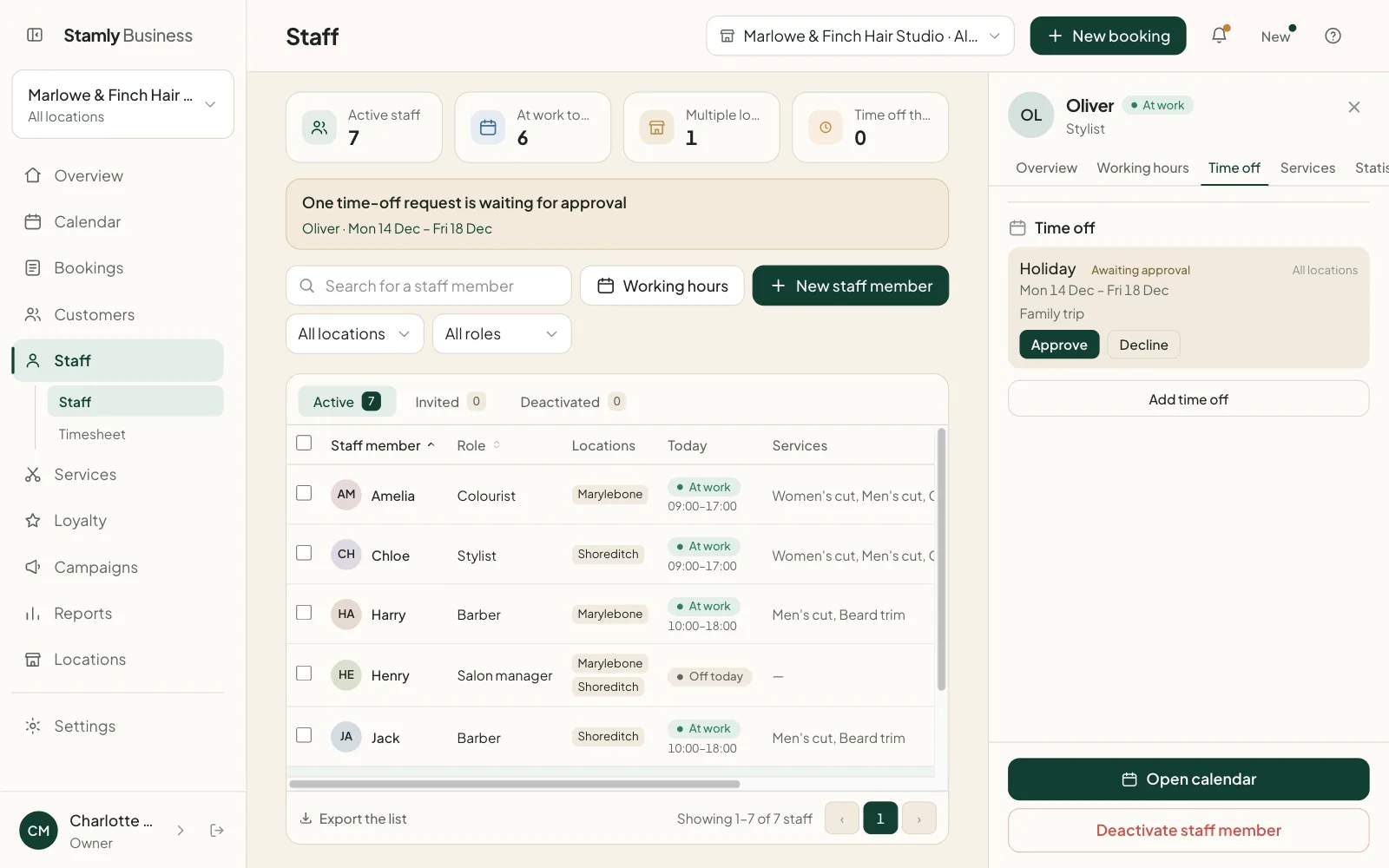
The owners and managers who share a location with her get a notification with her name and the dates. Tapping it opens the request with the type, her comment and the number of customer appointments already booked in that period. Then it is “Approve” or “Decline”.
In the portal, the Staff page shows a line when something is waiting, such as “One time-off request awaiting approval”, with a link straight to the Time off tab for that person. A manager only sees requests from their own locations.
The staff member hears back either way, whether the time off was approved or not.
What happens in the calendar once time off is approved?
Customers see no free times with her for that period, either in the app or on the salon’s booking page online. You don’t have to block anything by hand, and nobody gets booked in during her holiday because someone forgot to update the diary.
Appointments already booked are not cancelled automatically. A customer who booked a colour three weeks ago should hear about it from the salon, not from an automated message. When you approve, Stamly shows how many appointments fall in that period, so you know how many phone calls are ahead of you.
Sick leave is nobody else’s business
Colleagues only see that she is off: Time off in the calendar and Away in the staff list. The type and the comment are visible to her and to the owner or manager responsible for her.
Notifications don’t say what kind of absence it is either. A notification can pop up on a lock screen, and “Sick leave” has no place there.
The salon chooses how long sick leave stays recorded as sick leave, from 1 to 60 months, 12 if you don’t change it. After that it becomes “Other”. The days still count correctly in old timesheets, but nobody can see that it was illness.
Short errands, and time off a manager enters
An hour of paperwork or a long lunch isn’t really time off. With “Block time” a stylist can close up to four hours in her own calendar without asking anyone. If a customer is already booked in that slot, Stamly refuses.
Owners and managers can also enter time off for a staff member directly in the portal, for one location or all of them, with a note only they can see. That applies immediately, the same as time off they record for themselves.
Time off: common questions
How does a staff member request time off in Stamly?
She goes to Profile and Time off in Stamly Business, taps “Request time off”, picks the type and the days, and sends it. The owner or a manager gets a notification and approves or declines.
Who approves time off in Stamly?
An owner or a manager at a location where the staff member works, either in Stamly Business or in the portal. Time off that owners and managers record for themselves is approved straight away.
Can customers still book a stylist who has asked for time off?
Yes, until it is approved. A pending request doesn’t close any times. Once it is approved, customers no longer see free times with that stylist in the period.
What happens to existing bookings when time off is approved?
They stay where they are. Stamly shows how many appointments fall in the period, and the salon moves or cancels them itself.
Can colleagues see why someone is off?
No. Colleagues see that the person is away. The type of absence and the comment are only visible to the staff member and the owner or manager.
Can time off be booked for just a few hours?
Yes. Time off can be requested with start and end times instead of whole days. For short gaps of up to four hours, a stylist can block time in her own calendar without approval.
More features for your salon
See how booking, customers, staff and loyalty fit together in Stamly.
See all of Stamly for your salon
Appointment book, customers, staff, loyalty and the overview, in one platform.