
Time tracking for hair salons, with a clock-in app for staff
Your stylists clock in and out on their phones while they are standing in the salon. In the portal you see their hours next to the rota, with anything waiting for approval at the top.
Time tracking at a glance
- Staff clock in with Stamly Business, and it only works when the phone is at the location: within 200 metres unless the salon has set a different distance.
- If someone forgets to clock out, Stamly closes the entry at a time the salon chooses.
- Clock-ins count straight away. Hours logged by hand and corrections wait for the owner or a manager.
- The timesheet in the portal compares worked time with the rota day by day, and approved hours download as a CSV file.
A missed clock-out, from evening to timesheet
Ida clocks in in the morning and leaves her phone in her coat pocket at night. This is what she sees, what her manager sees, and what ends up in the timesheet.
Time tracking
Ida, stylistMon 08:57
Clocks in at Holtegata. The card shows “Clocked in at 08:57”.
Ida, stylist12:00
Start break. “On break since 12:00” until she taps End break.
Stamly Business21:00
The entry was still open, so Stamly clocked her out automatically and told her.
Ida, stylistTue 08:40
Corrects the finish time to 17:05 under My hours. Sent for approval.
Kari, manager09:15
Approves the correction. Ida gets a notification that her hours are approved.
TimesheetThis week
Monday: worked 7 h 38 min, rota 7 h 30 min. Within a quarter of an hour, so the difference stays in the normal colour.
The time clock lives in the app stylists already use
“Clock in” sits in Stamly Business, the same app where each stylist runs her day. The recording shows Today, the customer card and the appointments coming up. No sound.
Clocking in on the phone, only at the salon
The time clock card is at the top of Today in Stamly Business. It says “Clock in”, and once she is in, “Start break” and “Clock out”. That is all of it.
The app checks where the phone is before she taps. If she is further from the location than the limit the salon has set (200 metres if nobody has changed it), the button is greyed out and the card tells her how far away she is, for example 1.2 km from Holtegata. Nobody clocks in from the tram.
The distance is saved with the entry, and you can see it in the timesheet. A determined person can fake a phone’s location, so we show you the number rather than calling it proof.
When someone forgets to clock out
It happens in every salon. The last customer leaves, the lights go off, and the phone is in a coat pocket.
In the portal, under Settings → Time tracking, you pick a time of day. If an entry is still open at that time, Stamly closes it, marks it as clocked out automatically and lets the staff member know. Next morning she taps the day under My hours and enters when she actually left. The correction goes to the owner or manager, and the original entry stands until someone says yes.
If she never clocked in at all, she uses “Log hours” instead. The form is already filled in with her shift from the rota for that day, so she only changes what was different.
What the timesheet shows you
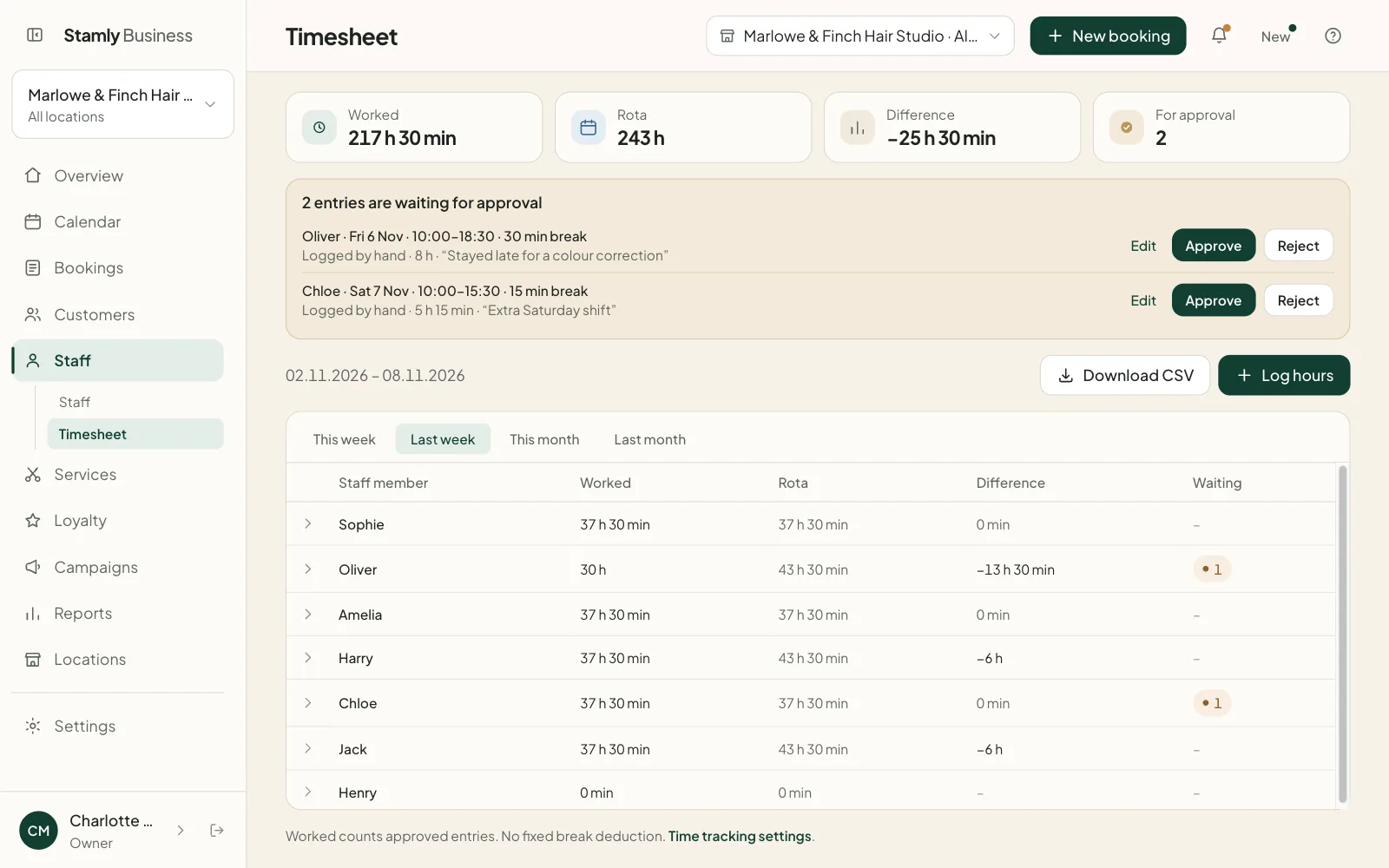
Staff → Timesheet in the portal has one row per staff member for the period you pick: this week, last week, this month or last month. Four totals sit at the top: Worked, Rota, Difference and For approval.
The difference is shown by colour alone. Under the rota is the normal colour, over it is yellow, and more than an hour over on a single day is red. Anything within a quarter of an hour counts as on time, so nobody turns yellow for staying seven minutes to sweep up.
Click a row and you get every entry with date, start, finish, break and time worked. You can edit or delete an entry there, and the salon’s log keeps a record of how it looked before.
Who approves hours, and who sees what?
Clock-ins count straight away. Hours logged by hand and corrections wait. The owners and managers who share a location with that staff member get a notification and answer in the portal, or in the app under Profile → Approve hours. The staff member hears back once it is decided.
Only owners and managers see the timesheet. The owner sees everyone; a manager sees the staff at their own locations. Stylists and receptionists see their own hours under My hours, week by week or month by month, going back a year.
- Automatic break deduction: the salon can take off, say, 30 minutes on long days. If she logged a longer break herself, hers applies.
- Once the day’s rota has been worked, “Clock in” is switched off. Extra time goes in under My hours and is approved.
- On a day with no shift on the rota she can clock in as normal, for example when you call someone in on a day off.
- No entry runs past midnight, and none can be longer than 16 hours.
The CSV file, and what Stamly leaves to payroll
“Download CSV” gives you the approved entries for the period. Anything still pending is left out, so the file you pass on matches what you signed off.
Stamly does not calculate pay, overtime supplements or holiday pay. The file is what you give your accountant, or import into the payroll system you already use.
The salon decides how long clock-ins, hours and absence are kept: anywhere from one to ten years, five if you leave the setting alone.
Time tracking: common questions
Can staff clock in from home with Stamly?
No. Stamly Business checks where the phone is. If the staff member is further from the location than the salon’s limit, 200 metres by default, she can’t clock in or out.
What happens if a stylist forgets to clock out?
Stamly clocks her out automatically at the time the salon has chosen and tells her in the app. She corrects the finish time under My hours, and the correction goes to the owner or manager for approval.
Do all hours have to be approved?
No. Clock-ins count straight away. Hours logged by hand and corrections to earlier entries wait until the owner or a manager has approved them.
Who can see the timesheet in a salon using Stamly?
Owners and managers. The owner sees all staff, a manager sees the staff at their own locations. Every staff member sees their own hours in Stamly Business.
Can I use the Stamly timesheet for payroll?
You can download the approved hours as a CSV file and use them in your own payroll routine. Stamly does not calculate pay and is not a payroll system.
Does time tracking cost extra?
No. The timesheet and time clock are part of the package, along with the appointment book and Stamly Business for your staff.
More features for your salon
See how booking, customers, staff and loyalty fit together in Stamly.
See all of Stamly for your salon
Appointment book, customers, staff, loyalty and the overview, in one platform.